Spotify Data Pipeline
Built a scalable azure data platform with dynamic, metadata driven ingestion, incremental cdc pipelines, and databricks silver gold transformations using autoloader, unity catalog, and delta live tables
In the world of Data Engineering, writing a pipeline that moves data from Point A to Point B is easy. Writing a pipeline that scales to 100+ tables without needing 100+ manual changes? That’s the real challenge.
For my latest project, I built an end-to-end data solution using Azure Data Factory (ADF), Azure Data Lake Gen2, and Databricks (Unity Catalog). The goal wasn’t just to move Spotify data; it was to build a framework that is resilient, automated, and metadata-driven.
Architecture Diagram
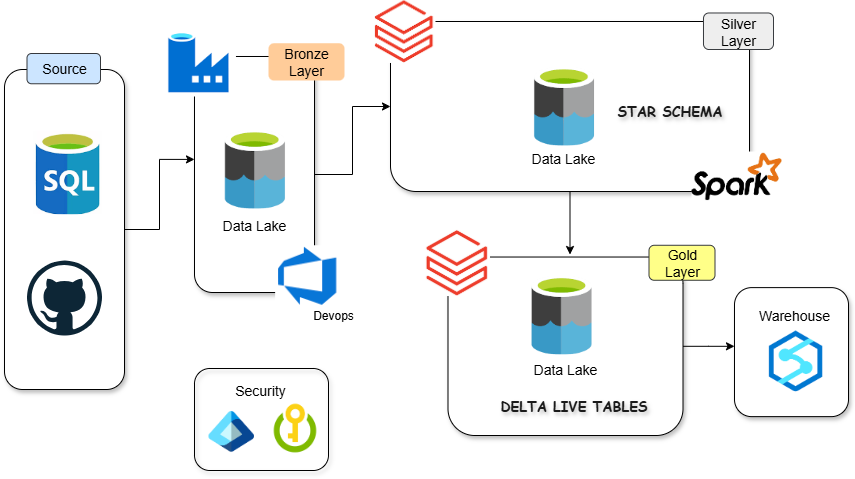
Tech Stack: Azure Data Factory, SQL, ADLS Gen2, Databricks (PySpark, DLT, Unity Catalog), Logic Apps, GitHub.
Phase 1: The Ingestion Engine (Azure Data Factory)
I needed to ingest data from an Azure SQL Database (simulating a transactional system) to the Data Lake (Bronze Layer). The Wrong Way: Creating 20 different pipelines for 20 different tables. The “Smart” Way: A single, Metadata-Driven Pipeline.
1. The Metadata-Driven Approach
Instead of hardcoding table names, I hosted a loop_input.json configuration file on GitHub.
- Lookup Activity: ADF fetches this JSON via an HTTP Linked Service.
- ForEach Loop: The pipeline iterates through every table defined in the config.
This means if I need to add a new table, I don’t touch the ADF pipeline code. I simply update the JSON file on GitHub.
2. Incremental Loading (The “High Watermark” Strategy)
Full loads are expensive. I implemented a robust CDC (Change Data Capture) logic using a watermark approach:
- Lookup Last CDC: The pipeline reads a
cdc.jsonfile from the Data Lake to find the timestamp of the last successful run. - Dynamic Querying: I injected dynamic SQL into the Copy Activity:
1
2
SELECT * FROM @{item().schema}.@{item().table}
WHERE @{item().cdc_col} > '@{activity('last_cdc').output.value[0].cdc}'
- Handling Backfill: I added logic to check if a
from_dateparameter exists. If it does, the system ignores the watermark and performs a historical backfill.
3. Self-Healing State Management
To update the watermark for the next run, I calculated the MAX(timestamp) from the source data.
- Optimization: I added an If Condition
(@greater(dataRead, 0)). The watermark only updates if new data was actually read. - Cleanup: If zero rows are read, a Delete Activity removes the empty Parquet files to keep the lake clean.
Phase 2: Governance & Compute (Databricks Unity Catalog)
Once the data hit the Data Lake (Bronze), I used Azure Databricks for transformation. Instead of legacy mounting, I utilized Unity Catalog for modern governance.
1. Secure Access (No Keys)
I set up an Access Connector for Databricks with a Managed Identity. This allowed Databricks to talk to ADLS Gen2 without hardcoding access keys or SAS tokens in notebooks.
2. The Medallion Architecture
- Bronze: Raw Parquet files ingested by ADF.
- Silver (Cleansing): I used Autoloader to ingest raw files. I built a reusable Python class
(transformations.py)to handle routine tasks like dropping_rescued_dataand deduping records. - Gold (Aggregation): Business-level aggregates.
3. Delta Live Tables (DLT) & Quality
For the Gold layer, I implemented Delta Live Tables. This allowed me to define Data Quality Expectations
1
@dlt.expect_all_or_drop({"valid_id": "id IS NOT NULL"})
If a record breaks the rules, it is dropped immediately, ensuring the analysts only see clean data.
Phase 3: DevOps & Monitoring
A pipeline isn’t “production-ready” until it’s automated and monitored.
1. Databricks Asset Bundles (DAB)
I moved away from manual notebook deployment. I initialized a project using databricks bundle init.
- Defined infrastructure in
databricks.yml. - Deployed separate environments (Dev) via CLI:
1
databricks bundle deploy --target dev
This brings CI/CD practices directly into the data workflow.
2. Alerting with Logic Apps
If the ADF pipeline fails, silence is dangerous.
- I created an Azure Logic App triggered by an HTTP WebHook.
- On pipeline failure, ADF sends a JSON payload (Pipeline Name, Run ID) to the Logic App.
- The Logic App automatically formats and sends a generic email alert to the support team.
Conclusion
This project started as a simple ETL task but evolved into a masterclass on Azure Data Engineering patterns.
- We decoupled configuration from code (Metadata-driven).
- We secured data access (Unity Catalog).
- We automated deployment (DABs).
Building pipelines is easy. Building pipelines that maintain themselves is where the real engineering happens.
Connect me on Threads Linkedin
Check out my resume