End-to-End Azure Data Engineering Pipeline
Built an end-to-end Azure data pipeline using Data Factory, Databricks, Synapse, and ADLS Gen2 to automate ingestion, transformation, and analytics with Medallion Architecture.
Introduction
In today’s data-driven world, organizations rely heavily on clean, structured, and accessible data to make informed decisions. As part of my learning journey in data engineering, I built a complete Azure-based data pipeline an end-to-end workflow that ingests data from multiple sources, transforms it into valuable insights, and visualizes the results.
The main goal of this project was to automate the entire data flow using Azure’s powerful ecosystem from data ingestion to analytics while following a Medallion Architecture approach (Bronze, Silver, and Gold layers).
Project Overview
The project integrates several key Azure services to move data seamlessly across each stage of its lifecycle. Here’s the high-level flow:
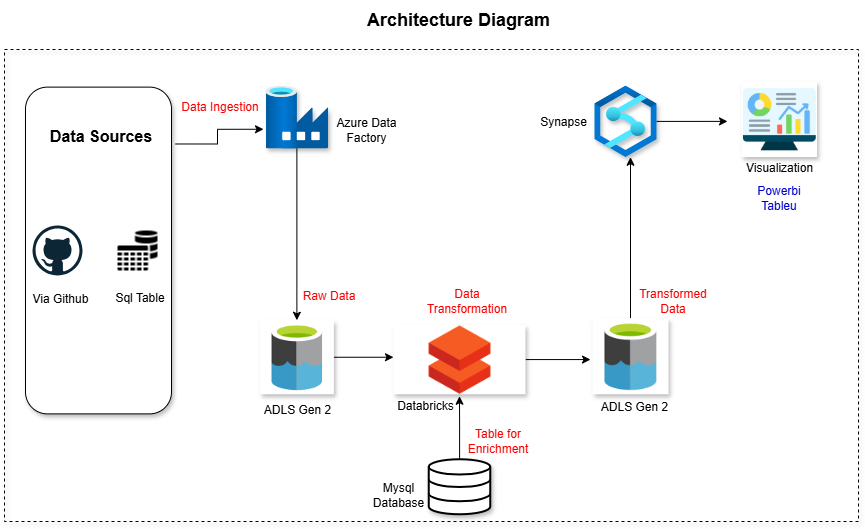
Data Ingestion – Raw data is collected from sources like GitHub and a MySQL database using Azure Data Factory.
Data Storage – The ingested data is stored in Azure Data Lake Storage Gen2, which acts as the central data repository.
Data Transformation – Azure Databricks processes, cleans, and enriches the data to prepare it for analytics.
Data Serving – The transformed data is loaded into Azure Synapse Analytics for querying and analysis. And after that with the help of view and cetas(CREATE EXTERNAL TABLE AS SELECT) load the data into the ADLS as a gold layer for serving.
This structured architecture ensures that data flows efficiently from raw to refined stages, ready for business insights.
Understanding the Technology Stack
Here’s a quick look at the tools I used and why:
- Azure Data Factory – Automates and orchestrates data workflows between multiple cloud and on-premises sources.
- Azure Data Lake Storage Gen2 – A scalable and secure data lake for storing massive datasets in structured layers.
- Azure Databricks – A collaborative data platform for transforming and enriching data using Spark-based processing.
- Azure Synapse Analytics – Combines big data and data warehousing capabilities to serve analytics at scale.
Data Architecture
The architecture follows a layered data lake model:
- Bronze Layer (Raw Data): This layer stores the original, unprocessed data ingested directly from external sources.
- Silver Layer (Cleaned Data): Here, data undergoes cleaning, transformation, and enrichment using Databricks to ensure quality and consistency.
- Gold Layer (Analytics-Ready Data): The final layer contains aggregated and structured data, optimized for reporting and analysis.
Building the Pipeline
Data Ingestion with Azure Data Factory
The first step was to design an automated ingestion pipeline using Azure Data Factory (ADF). ADF is a cloud-based ETL (Extract, Transform, Load) tool that orchestrates data movement between various sources and destinations.
Using ADF, I connected to two different sources GitHub for CSV files and a MySQL database for transactional data. The pipelines were designed to copy this data into Azure Data Lake Storage Gen2 (ADLS Gen2). This storage acted as the Bronze Layer, where all the raw, unprocessed data was securely stored.
Data Transformation with Azure Databricks
Once the data was available in ADLS, I moved to the transformation phase using Azure Databricks, a cloud-based platform built on Apache Spark.
Databricks allowed me to clean, filter, and standardize the data efficiently. I removed null values, standardized column formats, and handled inconsistencies.
In addition to cleaning, I performed data enrichment pulling extra information from a MySQL database to enhance the existing dataset. For example, I joined reference tables to add more meaningful attributes to the raw data.
After transformation and enrichment, the processed data was written back into ADLS Gen2 this time into the Silver Layer.
Data Serving and Querying with Synapse Analytics
Next, I used Azure Synapse Analytics to make the transformed data queryable and analysis-ready. Synapse is a powerful analytics service that allows data professionals to query large datasets directly from ADLS using serverless SQL pools.
I connected Synapse to the Silver Layer in ADLS and created SQL views to organize the data for analysis. Using CETAS (Create External Table As Select) statements, I then exported these SQL results into the Gold Layer of ADLS. This layer served as the curated, analytics-ready zone for downstream applications.
Key Learnings
Working on this project gave me hands-on experience with how real-world data engineering systems operate. I learned how to:
- Design data pipelines that move data automatically across multiple services.
- Implement the Medallion Architecture (Bronze-Silver-Gold) for organized data storage.
- Manage service integrations and permissions between Databricks, ADLS, and Synapse.
- Transform and enrich data using PySpark.
- Build an end-to-end workflow that supports analytics and visualization.
This project showed me the importance of automation, scalability, and clean data governance in building robust cloud data systems.
Conclusion
Building this Azure Data Engineering pipeline was more than just connecting services it was about understanding how data moves and transforms through each stage of its journey.
From raw ingestion to refined analytics, I experienced firsthand how each Azure component Data Factory, ADLS, Databricks, and Synapse plays a crucial role in creating a seamless, automated, and scalable data workflow.
It’s a project that truly demonstrates how modern data architecture turns scattered information into actionable insights the foundation of every data-driven organization.
Access the full resources from here.
Connect me on Threads Linkedin
Check out my resume